

Data Model
Honcho has a hierarchical data model centered around the entities below.- A Workspace has Peers & Sessions
- A Peer can be in multiple Sessions and can send Messages in a Session
- A Session can have many Peers and stores Messages sent by its Peers
Workspaces
Workspaces are the top-level containers in Honcho. They provide complete isolation between different applications or environments, essentially serving as a namespace to keep different workloads separate. You might use separate workspaces for development, staging, and production environments, or to isolate different product lines. They also enable multi-tenant SaaS applications where each customer gets their own isolated workspace with complete data separation. Authentication is issued at the workspace level, and configuration settings can be applied workspace-wide to control behavior across all peers and sessions within that workspace.Peers
Peers are the most important entity in Honcho—everything revolves around building and maintaining their representations. A peer represents any individual user, agent, or entity in a workspace. Treating humans and agents the same way lets you build arbitrary combinations for multi-agent or group chat scenarios. Each peer has a unique identifier within a workspace and is a container for reasoning across all their sessions. This cross-session context means conclusions drawn about a peer in one session can inform interactions in completely different sessions. Peers can be configured to control whether Honcho reasons about them. You can use peers for any entity that persists over time—individual users in chatbot applications, AI agents interacting with users or other agents, customer profiles in support systems, student profiles in educational platforms, or even NPCs in role-playing games.Sessions
Sessions represent interaction threads or contexts between peers. A session can involve multiple peers and provides temporal boundaries for when a set of interactions starts and ends. This lets you confine context and memory to specific interactions while still maintaining longer-term peer representations that span sessions. Use sessions for things like support tickets, meeting transcripts, learning sessions, or conversations. You can also use single-peer sessions as a way to import external data—create a session with just one peer and structure emails, documents, or files as messages to enrich that peer’s representation. Session-level configuration gives you fine-grained control over perspective-taking behavior. You can configure whether a peer should form representations of other peers in the session, and whether other peers should form representations of them. Sessions are also the unit of visibility: when one peer’s history spans contexts that shouldn’t inform each other, you can group sessions into named scopes that bound recall to just those sessions.Messages
Messages are the fundamental units of interaction within sessions. While they typically represent back-and-forth communication between peers, you can also use messages to ingest any information that provides context—emails, documents, files, user actions, system notifications, or rich media content. Every message is attributed to a specific peer and ordered chronologically within its session. When messages are created, they trigger automatic background reasoning that updates peer representations. Messages support rich metadata and structured data through JSONB fields, making them flexible enough to capture whatever information matters for your use case.Data Flow
Understanding how data moves through Honcho helps clarify the architecture. When you create messages, they’re immediately written to PostgreSQL and reasoning tasks are added to background queues. Background workers then generate logic, summaries, and new insights to improve representations. These conclusions and insights get stored in vector collections for retrieval. This async approach ensures fast writes while still providing rich reasoning capabilities. When you need context from Honcho, you query through the “Chat” endpoint or “Get Context” endpoint. Honcho retrieves relevant conclusions from vector storage along with recent messages, then assembles everything into coherent context ready to inject into agent prompts.
Under the Hood: Write, Reasoning, and Query Paths
Honcho runs as two cooperating processes: an API server that handles requests and enqueues background work, and a worker that consumes that work off the queue. This split is what keeps the write path fast—your request never waits on an LLM call.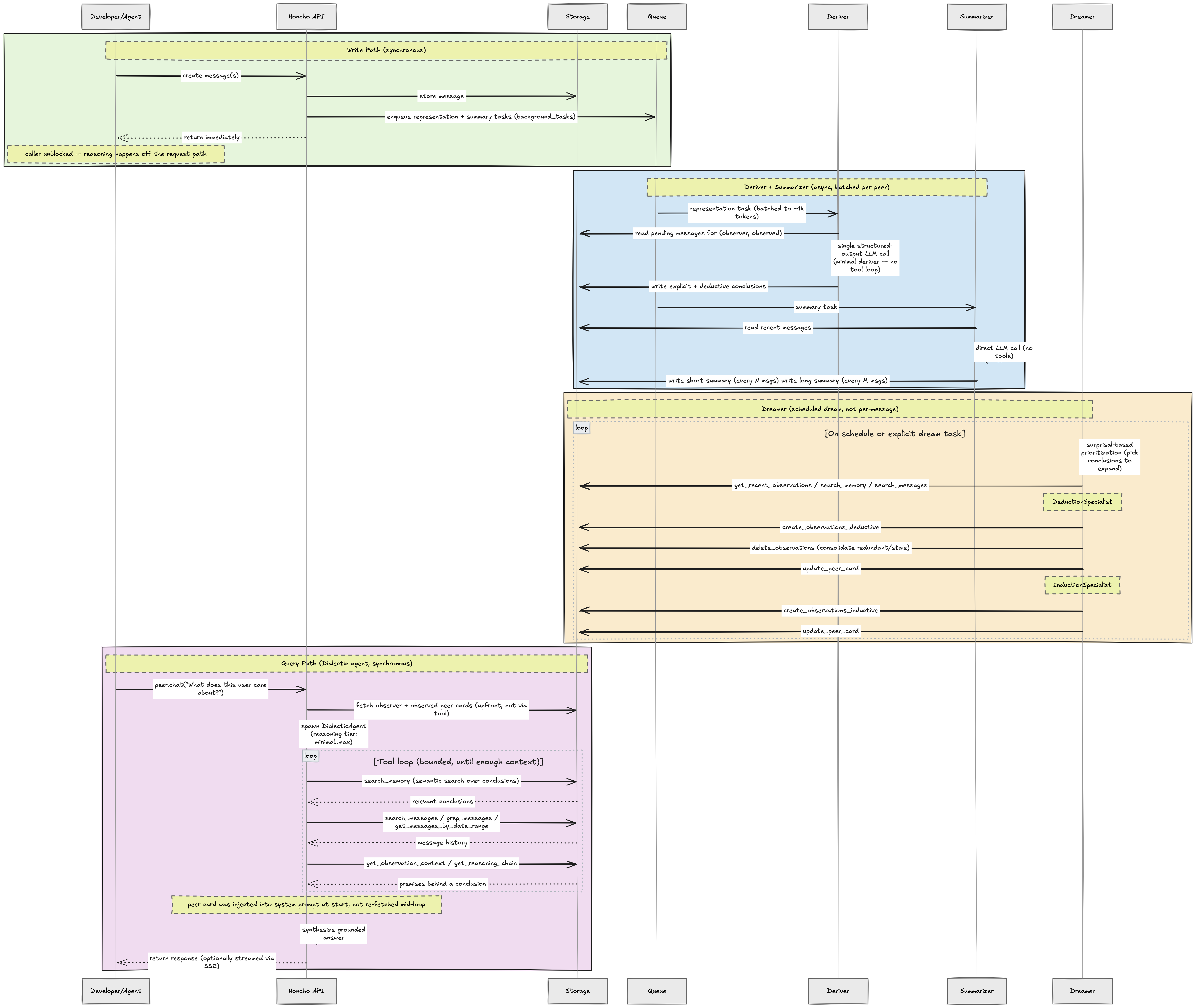
chat() call spawns a Dialectic agent that answers your question by exploring memory—searching conclusions semantically, pulling supporting messages, and tracing a conclusion back to the premises it was drawn from—before synthesizing a grounded answer. This all happens inline during the request, since answering well is worth the latency that write-path reasoning is designed to avoid.
The same agent runs in two shapes. peer.chat() is anchored to one (observer, observed) pair and prefetches the conclusions relevant to the query, so it can often answer from that context alone. honcho.chat() has no anchor peer: it prefetches workspace stats and the most active peers’ cards as a routing aid, is required to search before answering, and then reads memory pair by pair with [observer->observed] attribution. See Workspace Chat.
Configuration & Extensibility
Honcho is designed to be flexible. Settings cascade hierarchically from workspace to peer to session, so you can set defaults at the workspace level and override them for specific peers or sessions. Feature flags let you enable or disable reasoning modes, perspective tracking, and other capabilities. You can bring your own LLM provider—OpenAI, Anthropic, or custom endpoints—and metadata fields let you extend any primitive with custom JSON data. Batch operations let you create up to 100 messages in a single API call for efficient bulk ingestion.Design Principles
Honcho’s architecture follows a few core principles. Everything revolves around building representations of peers (peer-centric). Memory isn’t just storage—it’s continual learning (reasoning-first). Long-lived operations happen in the background so they don’t block user interactions (async by default). The system works with any LLM provider (provider-agnostic) and is built for isolation and scalability from the ground up (multi-tenant). Users and agents are both represented as peers, which enables flexible scenarios you couldn’t easily model with a traditional user-assistant paradigm (unified paradigm).Next Steps
Get an API Key
Sign up for the Honcho platform and start building
Quickstart
Get started with your first integration
Reasoning
Learn how Honcho reasons about messages to build memory
Peer Representations
Understand what peer representations are and how they work