> ## Documentation Index
> Fetch the complete documentation index at: https://honcho.dev/docs/llms.txt
> Use this file to discover all available pages before exploring further.
# Representation Scopes
> Advanced configuration and querying for representations
Assuming reasoning is enabled, you can control the perspectives representations are built from. This page covers:
1. **Default Behavior** — Honcho reasons over every message written to a peer
2. **Observer-Observed Model** — How peers build representations of other peers
3. **Querying with Target** — Accessing perspective-specific representations
4. **Use Cases** — When to use directional representations
## Default: Reasoning On
When `observe_me=true` (the default), Honcho forms one representation per peer, reasoning over every message written to that peer across all sessions.
You can retrieve a subset of conclusions from a peer's representation using `representation()`:
```python theme={null}
# Retrieve conclusions from Honcho's representation of Alice (across all sessions)
alice_rep = session.representation("alice")
# Or via chat
response = alice.chat("What are Alice's main interests?", session_id=session.id)
```
This is sufficient for most applications—Honcho reasons over every message written to the peer, storing conclusions that any part of your system can retrieve.
## Observer-Observed Representations
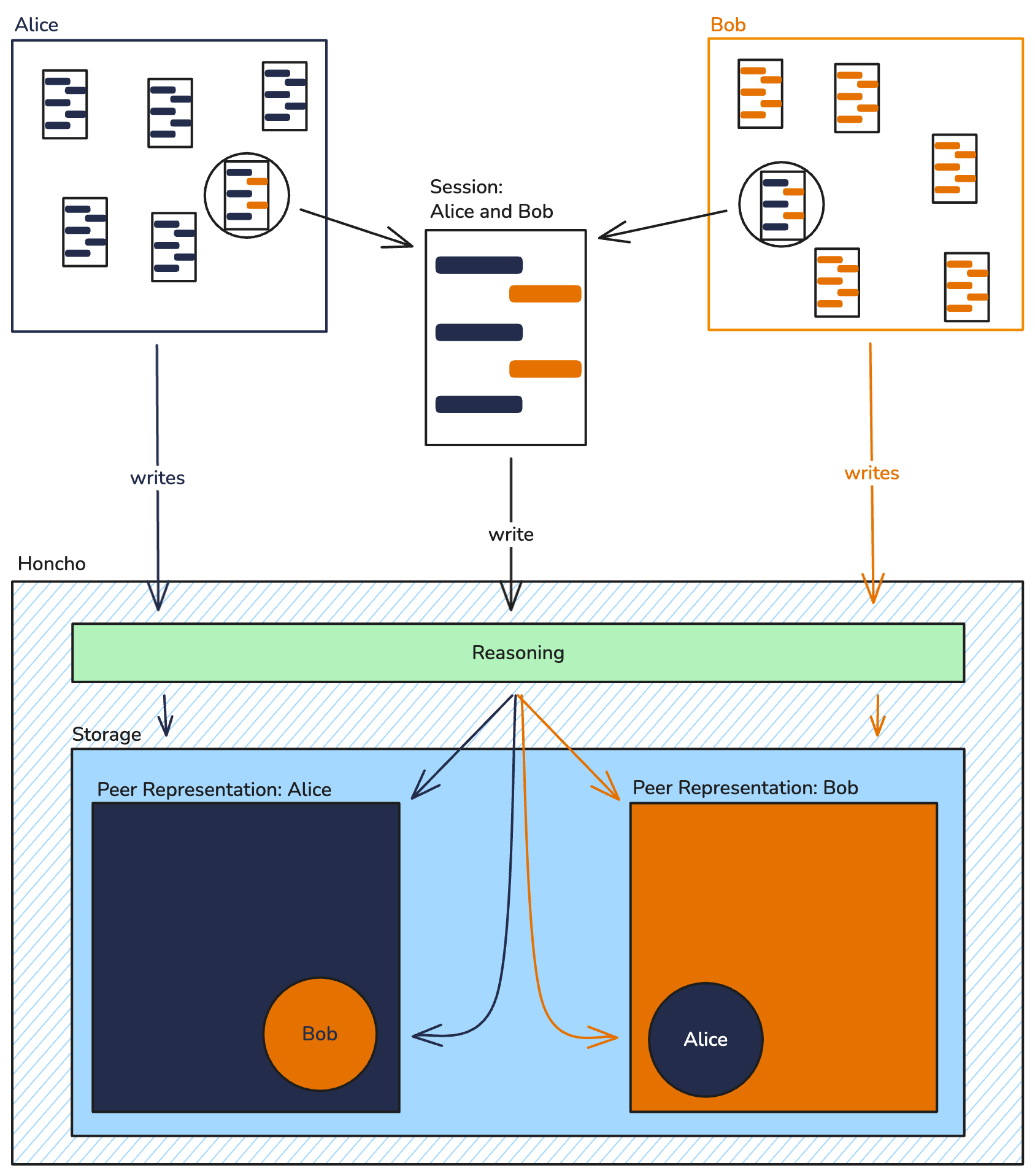
When you enable `observe_others=true` at the session level, peers begin forming **directional representations** of other peers they interact with. These representations are scoped to what that observer has actually witnessed.
### How It Works
Each peer has **one representation**, but that representation can contain reasoning about:
* **Itself** (when Honcho observes the peer with `observe_me=true`)
* **Other peers** (when the peer observes others with `observe_others=true`)
These are stored as separate (observer, observed) pairs in Honcho's internal collections:
| Observer | Observed | What This Represents |
| -------- | -------- | ----------------------------------------------------------------------- |
| alice | alice | Honcho's representation of Alice (across all sessions) |
| alice | bob | Alice's representation of Bob (from sessions Alice participated in) |
| alice | charlie | Alice's representation of Charlie (from sessions Alice participated in) |
### Information Segmentation
This enables sophisticated scenarios where different agents have different knowledge based on what they've actually witnessed.
**Example**: Bob and Charlie tell different things to Alice in separate sessions.
```
Session 1 (Alice + Bob):
Bob → "I had pancakes for breakfast."
Session 2 (Alice + Charlie):
Charlie → "I had pancakes for breakfast. Bob is lying about his breakfast."
```
With `observe_others=true` enabled on Alice:
* **Alice's representation of Bob** only includes Session 1 (she heard Bob say he had pancakes)
* **Alice's representation of Charlie** only includes Session 2 (she heard Charlie's claim about Bob lying)
* **Honcho's representation of Alice** reasons over both sessions
 ## Querying with Target
The `target` parameter controls which representation you retrieve:
| Query | Returns |
| ------------------------------------------- | ---------------------------------------------------------------------------------------- |
| `representation("alice")` | Conclusions from Honcho's representation of Alice (across all sessions) |
| `representation("alice", target="bob")` | Conclusions from Alice's representation of Bob (from sessions Alice participated in) |
| `representation("alice", target="charlie")` | Conclusions from Alice's representation of Charlie (from sessions Alice participated in) |
### Code Examples
```python Python theme={null}
from honcho import Honcho
from honcho.api_types import SessionPeerConfig
honcho = Honcho()
session = honcho.session("game-session")
alice = honcho.peer("alice")
bob = honcho.peer("bob")
charlie = honcho.peer("charlie")
# Add peers to session
session.add_peers([alice, bob, charlie])
# Enable Alice to form representations of others
session.set_peer_configuration(alice, SessionPeerConfig(observe_others=True))
# Add messages
session.add_messages([
bob.message("I had pancakes for breakfast."),
charlie.message("I prefer waffles.")
])
# Different sessions with different participants
session2 = honcho.session("game-session-2")
session2.add_peers([alice, charlie])
session2.set_peer_configuration(alice, SessionPeerConfig(observe_others=True))
session2.add_messages([
charlie.message("I didn't have breakfast. I lied to Bob.")
])
# Retrieve conclusions from different perspectives
honcho_view = session.representation("alice") # Across all sessions
bob_view = session.representation("alice", target="bob") # Alice's view of Bob
charlie_view = session2.representation("alice", target="charlie") # Alice's view of Charlie
```
```typescript TypeScript theme={null}
import { Honcho } from "@honcho-ai/sdk";
const honcho = new Honcho({});
const session = await honcho.session("game-session");
const alice = await honcho.peer("alice");
const bob = await honcho.peer("bob");
const charlie = await honcho.peer("charlie");
await session.addPeers([alice, bob, charlie]);
await session.setPeerConfiguration(alice, { observeOthers: true });
await session.addMessages([
bob.message("I had pancakes for breakfast."),
charlie.message("I prefer waffles.")
]);
const session2 = await honcho.session("game-session-2");
await session2.addPeers([alice, charlie]);
await session2.setPeerConfiguration(alice, { observeOthers: true });
await session2.addMessages([
charlie.message("I didn't have breakfast. I lied to Bob.")
]);
// Retrieve conclusions from different perspectives
const honchoView = await session.representation("alice"); // Across all sessions
const bobView = await session.representation("alice", { target: "bob" }); // Alice's view of Bob
const charlieView = await session2.representation("alice", { target: "charlie" }); // Alice's view of Charlie
```
### Chat Endpoint with Target
The `target` parameter also works with the chat endpoint:
```python Python theme={null}
# Query using conclusions from Honcho's representation (across all sessions)
honcho_answer = alice.chat(
"What did Bob say about breakfast?",
session_id=session.id
)
# Query using conclusions from Alice's representation of Bob (from Alice's sessions only)
alice_answer = alice.chat(
"What did Bob say about breakfast?",
session_id=session.id,
target="bob"
)
```
```typescript TypeScript theme={null}
// Query using conclusions from Honcho's representation (across all sessions)
const honchoAnswer = await alice.chat(
"What did Bob say about breakfast?",
{ sessionId: session.id }
);
// Query using conclusions from Alice's representation of Bob (from Alice's sessions only)
const aliceAnswer = await alice.chat(
"What did Bob say about breakfast?",
{ sessionId: session.id, target: "bob" }
);
```
The `target` parameter only returns meaningful results if the observer peer has `observe_others=true` and has actually participated in sessions with the observed peer. Otherwise, the representation will be empty or non-existent.
## When to Use Directional Representations
### Use Cases Where This Matters
1. **Multi-agent games**: NPCs should only know what they've witnessed, not omniscient game state
2. **Information asymmetry scenarios**: Different agents have access to different information
3. **Perspective-dependent agents**: Agent behavior depends on their unique understanding of other agents
4. **Privacy-segmented systems**: Users should only see representations based on their interactions
### Use Cases Where Default Is Sufficient
1. **Single-user applications**: Only one user, so perspective doesn't matter
2. **Centralized knowledge systems**: All agents should share the same understanding
3. **Simple chatbots**: No multi-agent interaction or information segmentation needed
Most applications don't need directional representations. Start with the default Honcho-observes-all behavior and only enable `observe_others` when you need information segmentation between agents.
## Architecture: How It's Stored
Under the hood, Honcho stores representations as (observer, observed) pairs in internal collections:
* **Collection**: A unique (observer, observed, workspace) tuple containing documents
* **Documents**: Individual conclusions and artifacts (deductive, inductive, abductive conclusions, summaries, peer cards) with session scoping
When you retrieve with `target`, Honcho fetches documents from the specific (observer, observed) collection. When you retrieve without `target`, it fetches from the (peer, peer) collection—the peer's self-representation.
This architecture enables:
* **Efficient querying**: Each perspective is isolated and can be queried independently
* **Session filtering**: Within a collection, documents can be filtered by session
* **Scalability**: Adding more observers doesn't degrade query performance
## Semantic Search Parameters
Both `representation()` and `chat()` support semantic filtering to retrieve a subset of relevant conclusions. You can optionally filter by session to retrieve only conclusions from specific session context:
| Parameter | Type | Description |
| ----------------------- | ------- | ----------------------------------------- |
| `search_query` | `str` | Semantic query to filter conclusions |
| `search_top_k` | `int` | Number of results to include (1–100) |
| `search_max_distance` | `float` | Maximum semantic distance (0.0–1.0) |
| `include_most_frequent` | `bool` | Include most frequent conclusions |
| `max_conclusions` | `int` | Cap on total conclusions returned (1–100) |
```python Python theme={null}
# Retrieve conclusions about billing from Alice's representation of Bob
alice_view_billing = session.representation(
"alice",
target="bob",
search_query="billing issues",
search_top_k=10,
include_most_frequent=True
)
```
```typescript TypeScript theme={null}
const aliceViewBilling = await session.representation("alice", {
target: "bob",
searchQuery: "billing issues",
searchTopK: 10,
includeMostFrequent: true
});
```
## When Representations Update
Directional representations update automatically through the reasoning pipeline when:
1. A message is created in a session
2. The message sender has `observe_me=true` (or session-level equivalent)
3. Other peers in the session have `observe_others=true`
The pipeline respects scoping—Honcho's representations reason over messages across all sessions, while directional representations only reason over messages from sessions where the observer was an active participant.
### Peer Join Order Matters
Reasoning tasks are scheduled at the time a message is created, based on which peers are in the session **at that moment**. Honcho does not retroactively schedule reasoning for peers that join later.
This means:
* If Peer C joins a session **after** messages from Peer A and Peer B have already been sent, Peer C will **not** receive reasoning tasks for those earlier messages—even if Peer C has `observe_others=true`.
* Peer C will only begin observing new messages sent after they join the session.
* Similarly, if a peer leaves a session, they stop being included as an observer for any messages sent after their departure.
There is no retroactive reasoning. If your application needs an observer peer to reason about prior conversation history, add the peer to the session **before** messages are sent. Alternatively, use `peer.chat()` to include conversation history in the agent's context whether or not those messages were previously reasoned over.
Conclusions are cached for fast retrieval. Use `representation()` to retrieve stored conclusions for dashboards and analytics. Use `peer.chat()` when you need query-specific reasoning with natural language.
## Querying with Target
The `target` parameter controls which representation you retrieve:
| Query | Returns |
| ------------------------------------------- | ---------------------------------------------------------------------------------------- |
| `representation("alice")` | Conclusions from Honcho's representation of Alice (across all sessions) |
| `representation("alice", target="bob")` | Conclusions from Alice's representation of Bob (from sessions Alice participated in) |
| `representation("alice", target="charlie")` | Conclusions from Alice's representation of Charlie (from sessions Alice participated in) |
### Code Examples
```python Python theme={null}
from honcho import Honcho
from honcho.api_types import SessionPeerConfig
honcho = Honcho()
session = honcho.session("game-session")
alice = honcho.peer("alice")
bob = honcho.peer("bob")
charlie = honcho.peer("charlie")
# Add peers to session
session.add_peers([alice, bob, charlie])
# Enable Alice to form representations of others
session.set_peer_configuration(alice, SessionPeerConfig(observe_others=True))
# Add messages
session.add_messages([
bob.message("I had pancakes for breakfast."),
charlie.message("I prefer waffles.")
])
# Different sessions with different participants
session2 = honcho.session("game-session-2")
session2.add_peers([alice, charlie])
session2.set_peer_configuration(alice, SessionPeerConfig(observe_others=True))
session2.add_messages([
charlie.message("I didn't have breakfast. I lied to Bob.")
])
# Retrieve conclusions from different perspectives
honcho_view = session.representation("alice") # Across all sessions
bob_view = session.representation("alice", target="bob") # Alice's view of Bob
charlie_view = session2.representation("alice", target="charlie") # Alice's view of Charlie
```
```typescript TypeScript theme={null}
import { Honcho } from "@honcho-ai/sdk";
const honcho = new Honcho({});
const session = await honcho.session("game-session");
const alice = await honcho.peer("alice");
const bob = await honcho.peer("bob");
const charlie = await honcho.peer("charlie");
await session.addPeers([alice, bob, charlie]);
await session.setPeerConfiguration(alice, { observeOthers: true });
await session.addMessages([
bob.message("I had pancakes for breakfast."),
charlie.message("I prefer waffles.")
]);
const session2 = await honcho.session("game-session-2");
await session2.addPeers([alice, charlie]);
await session2.setPeerConfiguration(alice, { observeOthers: true });
await session2.addMessages([
charlie.message("I didn't have breakfast. I lied to Bob.")
]);
// Retrieve conclusions from different perspectives
const honchoView = await session.representation("alice"); // Across all sessions
const bobView = await session.representation("alice", { target: "bob" }); // Alice's view of Bob
const charlieView = await session2.representation("alice", { target: "charlie" }); // Alice's view of Charlie
```
### Chat Endpoint with Target
The `target` parameter also works with the chat endpoint:
```python Python theme={null}
# Query using conclusions from Honcho's representation (across all sessions)
honcho_answer = alice.chat(
"What did Bob say about breakfast?",
session_id=session.id
)
# Query using conclusions from Alice's representation of Bob (from Alice's sessions only)
alice_answer = alice.chat(
"What did Bob say about breakfast?",
session_id=session.id,
target="bob"
)
```
```typescript TypeScript theme={null}
// Query using conclusions from Honcho's representation (across all sessions)
const honchoAnswer = await alice.chat(
"What did Bob say about breakfast?",
{ sessionId: session.id }
);
// Query using conclusions from Alice's representation of Bob (from Alice's sessions only)
const aliceAnswer = await alice.chat(
"What did Bob say about breakfast?",
{ sessionId: session.id, target: "bob" }
);
```
The `target` parameter only returns meaningful results if the observer peer has `observe_others=true` and has actually participated in sessions with the observed peer. Otherwise, the representation will be empty or non-existent.
## When to Use Directional Representations
### Use Cases Where This Matters
1. **Multi-agent games**: NPCs should only know what they've witnessed, not omniscient game state
2. **Information asymmetry scenarios**: Different agents have access to different information
3. **Perspective-dependent agents**: Agent behavior depends on their unique understanding of other agents
4. **Privacy-segmented systems**: Users should only see representations based on their interactions
### Use Cases Where Default Is Sufficient
1. **Single-user applications**: Only one user, so perspective doesn't matter
2. **Centralized knowledge systems**: All agents should share the same understanding
3. **Simple chatbots**: No multi-agent interaction or information segmentation needed
Most applications don't need directional representations. Start with the default Honcho-observes-all behavior and only enable `observe_others` when you need information segmentation between agents.
## Architecture: How It's Stored
Under the hood, Honcho stores representations as (observer, observed) pairs in internal collections:
* **Collection**: A unique (observer, observed, workspace) tuple containing documents
* **Documents**: Individual conclusions and artifacts (deductive, inductive, abductive conclusions, summaries, peer cards) with session scoping
When you retrieve with `target`, Honcho fetches documents from the specific (observer, observed) collection. When you retrieve without `target`, it fetches from the (peer, peer) collection—the peer's self-representation.
This architecture enables:
* **Efficient querying**: Each perspective is isolated and can be queried independently
* **Session filtering**: Within a collection, documents can be filtered by session
* **Scalability**: Adding more observers doesn't degrade query performance
## Semantic Search Parameters
Both `representation()` and `chat()` support semantic filtering to retrieve a subset of relevant conclusions. You can optionally filter by session to retrieve only conclusions from specific session context:
| Parameter | Type | Description |
| ----------------------- | ------- | ----------------------------------------- |
| `search_query` | `str` | Semantic query to filter conclusions |
| `search_top_k` | `int` | Number of results to include (1–100) |
| `search_max_distance` | `float` | Maximum semantic distance (0.0–1.0) |
| `include_most_frequent` | `bool` | Include most frequent conclusions |
| `max_conclusions` | `int` | Cap on total conclusions returned (1–100) |
```python Python theme={null}
# Retrieve conclusions about billing from Alice's representation of Bob
alice_view_billing = session.representation(
"alice",
target="bob",
search_query="billing issues",
search_top_k=10,
include_most_frequent=True
)
```
```typescript TypeScript theme={null}
const aliceViewBilling = await session.representation("alice", {
target: "bob",
searchQuery: "billing issues",
searchTopK: 10,
includeMostFrequent: true
});
```
## When Representations Update
Directional representations update automatically through the reasoning pipeline when:
1. A message is created in a session
2. The message sender has `observe_me=true` (or session-level equivalent)
3. Other peers in the session have `observe_others=true`
The pipeline respects scoping—Honcho's representations reason over messages across all sessions, while directional representations only reason over messages from sessions where the observer was an active participant.
### Peer Join Order Matters
Reasoning tasks are scheduled at the time a message is created, based on which peers are in the session **at that moment**. Honcho does not retroactively schedule reasoning for peers that join later.
This means:
* If Peer C joins a session **after** messages from Peer A and Peer B have already been sent, Peer C will **not** receive reasoning tasks for those earlier messages—even if Peer C has `observe_others=true`.
* Peer C will only begin observing new messages sent after they join the session.
* Similarly, if a peer leaves a session, they stop being included as an observer for any messages sent after their departure.
There is no retroactive reasoning. If your application needs an observer peer to reason about prior conversation history, add the peer to the session **before** messages are sent. Alternatively, use `peer.chat()` to include conversation history in the agent's context whether or not those messages were previously reasoned over.
Conclusions are cached for fast retrieval. Use `representation()` to retrieve stored conclusions for dashboards and analytics. Use `peer.chat()` when you need query-specific reasoning with natural language.