> ## Documentation Index
> Fetch the complete documentation index at: https://honcho.dev/docs/llms.txt
> Use this file to discover all available pages before exploring further.
# Configure Reasoning
> Customizing how Honcho handles peers, sessions, and messages
Honcho's reasoning engine (the "deriver") can be configured at multiple levels to control how it processes messages, generates facts, creates summaries, and builds peer representations.
Configuration follows a hierarchy: **message > session > workspace > global defaults**. Settings at lower levels override those at higher levels, giving you fine-grained control over behavior.
## Configuration Hierarchy
Honcho uses a hierarchical configuration system where more specific settings override more general ones:
1. **Global Defaults**: Built-in system defaults
2. **Workspace Configuration**: Settings that apply to all sessions in a workspace
3. **Session Configuration**: Settings that apply to all messages in a session
4. **Message Configuration**: Settings that apply to a specific message
All configuration fields are optional. If not specified, the value is inherited from the next level up in the hierarchy.
## Configuration Options
### Deriver Configuration
Controls the core reasoning engine that extracts facts and insights from messages.
| Field | Type | Description |
| --------- | ------ | -------------------------------------------------------------------------------------------------- |
| `enabled` | `bool` | Whether to enable deriver functionality. When disabled, no facts or representations are generated. |
```python Python theme={null}
from honcho import Honcho
honcho = Honcho()
# Disable deriver at session level
session = honcho.session("private-session", config={
"deriver": {"enabled": False}
})
```
```typescript TypeScript theme={null}
import { Honcho } from "@honcho-ai/sdk";
const honcho = new Honcho({});
// Disable deriver at session level
const session = await honcho.session("private-session", {
config: {
deriver: { enabled: false }
}
});
```
### Peer Card Configuration
Controls how peer cards (concise summaries of what's known about a peer) are generated and used.
| Field | Type | Description |
| -------- | ------ | -------------------------------------------------------- |
| `use` | `bool` | Whether to use peer cards during the deriver process. |
| `create` | `bool` | Whether to generate peer cards based on message content. |
```python Python theme={null}
# Disable peer card generation but still use existing cards
session = honcho.session("my-session", config={
"peer_card": {"create": False, "use": True}
})
```
```typescript TypeScript theme={null}
// Disable peer card generation but still use existing cards
const session = await honcho.session("my-session", {
config: {
peer_card: { create: false, use: true }
}
});
```
### Summary Configuration
Controls automatic conversation summarization. Available at workspace and session levels only.
| Field | Type | Description |
| ---------------------------- | ------ | ------------------------------------------------------------------------------------------------------ |
| `enabled` | `bool` | Whether to enable summary functionality. |
| `messages_per_short_summary` | `int` | Number of messages between short summaries. Must be ≥ 10. |
| `messages_per_long_summary` | `int` | Number of messages between long summaries. Must be ≥ 20 and greater than `messages_per_short_summary`. |
```python Python theme={null}
# Customize summary frequency
session = honcho.session("verbose-session", config={
"summary": {
"enabled": True,
"messages_per_short_summary": 15,
"messages_per_long_summary": 45
}
})
```
```typescript TypeScript theme={null}
// Customize summary frequency
const session = await honcho.session("verbose-session", {
config: {
summary: {
enabled: true,
messages_per_short_summary: 15,
messages_per_long_summary: 45
}
}
});
```
### Dream Configuration
Controls the "dreaming" process that consolidates and refines representations. Available at workspace and session levels only.
| Field | Type | Description |
| --------- | ------ | ------------------------------------------------------------------------------------- |
| `enabled` | `bool` | Whether to enable dream functionality. Automatically disabled if deriver is disabled. |
```python Python theme={null}
# Disable dreams for a workspace
# (done via API when creating/updating workspace)
```
```typescript TypeScript theme={null}
// Disable dreams for a workspace
// (done via API when creating/updating workspace)
```
***
## Peer Configuration
By default, all peers are "observed" by Honcho. This means that Honcho will derive facts from messages sent by the peer and generate a representation of them. In most cases, this is why you use Honcho! However, sometimes an application requires a peer that should not be observed: for example, an assistant or game NPC that your program will never need to ask questions about.
You may therefore disable observation of a peer by setting the `observe_me` flag in their configuration to `false`.
If the peer has a session-level configuration, it will override this configuration. If the flag is not set, or is set to `true`, the peer will be observed.
```python Python theme={null}
from honcho import Honcho
# Initialize client
honcho = Honcho()
# Create peer with configuration
peer = honcho.peer("my-peer", config={"observe_me": False})
# Change peer's configuration
peer.set_config({"observe_me": True})
# Note: creating the same peer again will also replace the configuration
peer = honcho.peer("my-peer", config={"observe_me": False})
```
```typescript TypeScript theme={null}
import { Honcho } from "@honcho-ai/sdk";
(async () => {
// Initialize client
const honcho = new Honcho({});
// Create peer with configuration
const peer = await honcho.peer("my-peer", { config: { observe_me: false } });
// Change peer's configuration
await peer.setConfig({ observe_me: true });
// Note: creating the same peer again will also replace the configuration
await honcho.peer("my-peer", { config: { observe_me: false } });
})();
```
## Session Configuration
Sessions support the full configuration schema. You can disable the deriver entirely for a session, customize summary behavior, or adjust peer card settings.
```python Python theme={null}
from honcho import Honcho
# Initialize client
honcho = Honcho()
# Create session with deriver disabled
session = honcho.session("my-session", config={
"deriver": {"enabled": False}
})
# Create session with custom summary settings
session = honcho.session("detailed-session", config={
"summary": {
"messages_per_short_summary": 10,
"messages_per_long_summary": 30
}
})
```
```typescript TypeScript theme={null}
import { Honcho } from "@honcho-ai/sdk";
(async () => {
// Initialize client
const honcho = new Honcho({});
// Create session with deriver disabled
const session = await honcho.session("my-session", {
config: { deriver: { enabled: false } }
});
// Create session with custom summary settings
const detailedSession = await honcho.session("detailed-session", {
config: {
summary: {
messages_per_short_summary: 10,
messages_per_long_summary: 30
}
}
});
})();
```
## Message Configuration
Individual messages can override session and workspace configuration for fine-grained control. This is useful for excluding specific messages from processing or adjusting behavior on a per-message basis.
```python Python theme={null}
from honcho import Honcho
honcho = Honcho()
session = honcho.session("my-session")
user = honcho.peer("user")
# Create a message that skips deriver processing
session.add_messages([
user.message("This message won't be analyzed", config={
"deriver": {"enabled": False}
})
])
# Create a message with custom peer card settings
session.add_messages([
user.message("Use existing card but don't update it", config={
"peer_card": {"use": True, "create": False}
})
])
```
```typescript TypeScript theme={null}
import { Honcho } from "@honcho-ai/sdk";
(async () => {
const honcho = new Honcho({});
const session = await honcho.session("my-session");
const user = await honcho.peer("user");
// Create a message that skips deriver processing
await session.addMessages([
user.message("This message won't be analyzed", {
configuration: { deriver: { enabled: false } }
})
]);
})();
```
## Session-Peer Configuration
Configuration at the session-peer level controls how peers observe each other within a specific session. This is the most common use case for enabling "local representations" — where one peer forms a model of another peer based only on what they observe in that session.
There are two flags that can be set at the session-peer level:
* `observe_me`: Whether this peer should *be observed* by others in the session. By default, this is `true`. This overrides the peer-level `observe_me` flag.
* `observe_others`: Whether this peer should produce local representations of others in the session. By default, this is `false`. Other peers will only be observed if their `observe_me` flag is `true`.
You can combine these flags across multiple peers to arrange any possible permutation of directional observation. Note that in the default case, no local representations are produced. To produce local representations, you must set the `observe_others` flag to `true` for at least one peer in the session and at least one other peer must have their `observe_me` flag set to `true`.
Many applications will work best without local representations, preferring to chat with Honcho's top-down representation of each peer. Only enable local representations via the `observe_others` flag if you are doing advanced reasoning on user perspectives.
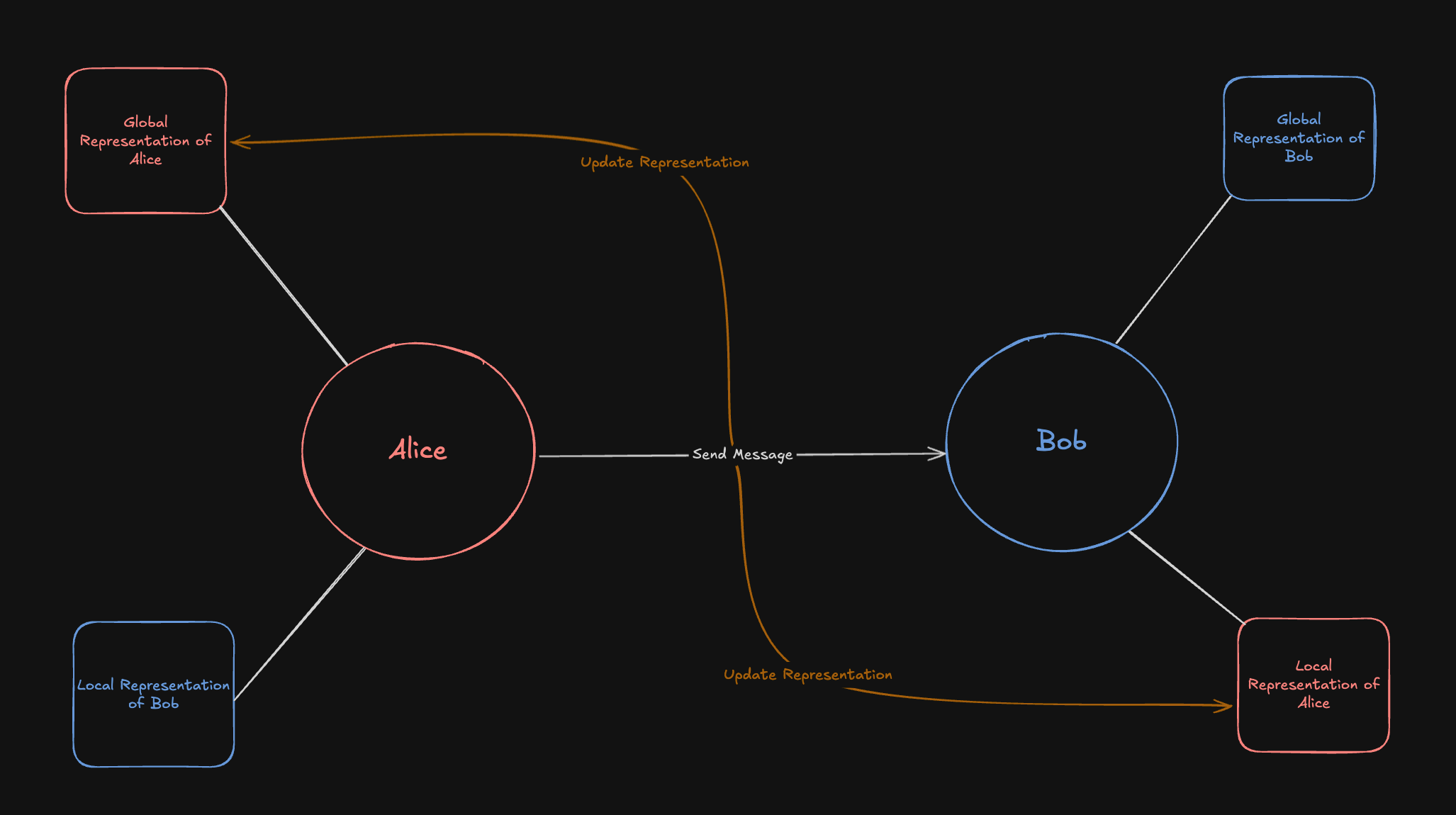 You can dynamically change the configuration of a session-peer by calling `set_peer_config` on the session with the peer and the configuration you want to set.
```python Python theme={null}
from honcho import Honcho, SessionPeerConfig
# Initialize client
honcho = Honcho()
# Create session
session = honcho.session("my-session")
# Create peers
alice = honcho.peer("alice")
bob = honcho.peer("bob")
# Add peers to session with default configuration
session.add_peers([alice, bob])
# Add another peer to the session with a custom configuration
charlie = honcho.peer("charlie")
session.add_peers([(charlie, SessionPeerConfig(observe_me=False, observe_others=True))])
# Set session-peer configuration
session.set_peer_config(alice, SessionPeerConfig(observe_others=True))
session.set_peer_config(bob, SessionPeerConfig(observe_me=False))
# Get session-peer configuration
charlie_config = session.get_peer_config(charlie)
print(charlie_config)
```
```typescript TypeScript theme={null}
import { Honcho } from "@honcho-ai/sdk";
(async () => {
// Initialize client
const honcho = new Honcho({});
// Create session
const session = await honcho.session("my-session");
// Create peers
const alice = await honcho.peer("alice");
const bob = await honcho.peer("bob");
// Add peers to session
await session.addPeers([alice, bob]);
// Add another peer to the session with a custom configuration
const charlie = await honcho.peer("charlie");
await session.addPeers([[charlie, { observe_me: false, observe_others: true }]]);
// Set session-peer configuration
await session.setPeerConfig(alice, { observe_others: true });
await session.setPeerConfig(bob, { observe_me: false });
// Get session-peer configuration
const charlieConfig = await session.getPeerConfig(charlie);
console.log(charlieConfig);
})();
```
### Observation and Peer Join Order
Reasoning tasks are scheduled at the time a message is created, based on which peers are in the session **at that moment**. Honcho does not retroactively schedule reasoning for peers that join later.
This means:
* If Peer C joins a session **after** messages from Peer A and Peer B have already been sent, Peer C will **not** receive reasoning tasks for those earlier messages—even if Peer C has `observe_others` enabled.
* Peer C will only begin observing new messages sent after they join the session.
* Similarly, if a peer leaves a session, they stop being included as an observer for any messages sent after their departure.
There is no retroactive reasoning. If your application needs an observer peer to reason about prior conversation history, add the peer to the session **before** messages are sent. Alternatively use the .chat() endpoint to include the conversation history in the agent's context, regardless of if they were reasoned against or not
## Full Configuration Schema Reference
### Workspace & Session Configuration
```json theme={null}
{
"deriver": {
"enabled": true
},
"peer_card": {
"use": true,
"create": true
},
"summary": {
"enabled": true,
"messages_per_short_summary": 20,
"messages_per_long_summary": 60
},
"dream": {
"enabled": true
}
}
```
### Message Configuration
```json theme={null}
{
"deriver": {
"enabled": true
},
"peer_card": {
"use": true,
"create": true
}
}
```
Message configuration only supports `deriver` and `peer_card` settings. Summary and dream configurations are session/workspace-level only.
You can dynamically change the configuration of a session-peer by calling `set_peer_config` on the session with the peer and the configuration you want to set.
```python Python theme={null}
from honcho import Honcho, SessionPeerConfig
# Initialize client
honcho = Honcho()
# Create session
session = honcho.session("my-session")
# Create peers
alice = honcho.peer("alice")
bob = honcho.peer("bob")
# Add peers to session with default configuration
session.add_peers([alice, bob])
# Add another peer to the session with a custom configuration
charlie = honcho.peer("charlie")
session.add_peers([(charlie, SessionPeerConfig(observe_me=False, observe_others=True))])
# Set session-peer configuration
session.set_peer_config(alice, SessionPeerConfig(observe_others=True))
session.set_peer_config(bob, SessionPeerConfig(observe_me=False))
# Get session-peer configuration
charlie_config = session.get_peer_config(charlie)
print(charlie_config)
```
```typescript TypeScript theme={null}
import { Honcho } from "@honcho-ai/sdk";
(async () => {
// Initialize client
const honcho = new Honcho({});
// Create session
const session = await honcho.session("my-session");
// Create peers
const alice = await honcho.peer("alice");
const bob = await honcho.peer("bob");
// Add peers to session
await session.addPeers([alice, bob]);
// Add another peer to the session with a custom configuration
const charlie = await honcho.peer("charlie");
await session.addPeers([[charlie, { observe_me: false, observe_others: true }]]);
// Set session-peer configuration
await session.setPeerConfig(alice, { observe_others: true });
await session.setPeerConfig(bob, { observe_me: false });
// Get session-peer configuration
const charlieConfig = await session.getPeerConfig(charlie);
console.log(charlieConfig);
})();
```
### Observation and Peer Join Order
Reasoning tasks are scheduled at the time a message is created, based on which peers are in the session **at that moment**. Honcho does not retroactively schedule reasoning for peers that join later.
This means:
* If Peer C joins a session **after** messages from Peer A and Peer B have already been sent, Peer C will **not** receive reasoning tasks for those earlier messages—even if Peer C has `observe_others` enabled.
* Peer C will only begin observing new messages sent after they join the session.
* Similarly, if a peer leaves a session, they stop being included as an observer for any messages sent after their departure.
There is no retroactive reasoning. If your application needs an observer peer to reason about prior conversation history, add the peer to the session **before** messages are sent. Alternatively use the .chat() endpoint to include the conversation history in the agent's context, regardless of if they were reasoned against or not
## Full Configuration Schema Reference
### Workspace & Session Configuration
```json theme={null}
{
"deriver": {
"enabled": true
},
"peer_card": {
"use": true,
"create": true
},
"summary": {
"enabled": true,
"messages_per_short_summary": 20,
"messages_per_long_summary": 60
},
"dream": {
"enabled": true
}
}
```
### Message Configuration
```json theme={null}
{
"deriver": {
"enabled": true
},
"peer_card": {
"use": true,
"create": true
}
}
```
Message configuration only supports `deriver` and `peer_card` settings. Summary and dream configurations are session/workspace-level only.